Home / Costright Risk
How much contingency does this job really need?
Costright Risk runs your estimate thousands of times, with a range on every cost and a chance on every risk. It shows the chance of each total, sets contingency from it, and keeps your costed risk register in the same workbook.
Online checkout is not open yet. Register interest and we will email you when it is. Prices are in Australian dollars and exclude GST, which is added at checkout.
- Price
- $395 once, ex GST
- Format
- One Excel workbook (.xlsm). Start a new project saves a copy under a new name for each job
- Works with
- Your Costright Estimate estimate, lines you type or paste, or a model in any open workbook
- Use
- One business, up to 3 people. No licence key and nothing to activate
- Needs
- Windows desktop Excel (Microsoft 365 or Excel 2024)
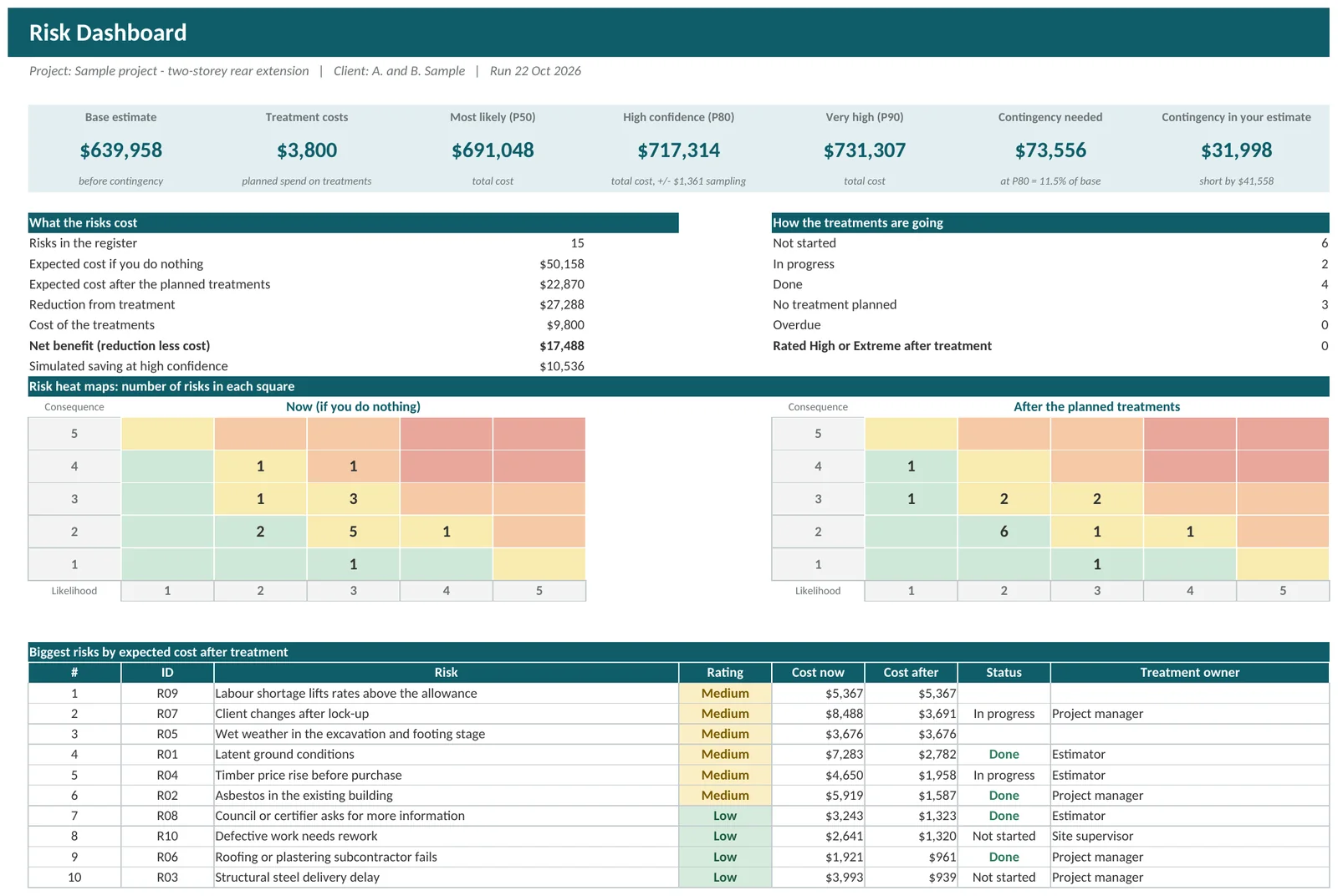
Six steps from estimate to answer
The workbook opens with a sample project, a two-storey rear extension, so you can see how everything fits. Click Clear sample data when you are ready to start your own.
Bring in your estimate
Open your Costright Estimate workbook, then click Import from Costright Estimate on the Start Here sheet. Your cost lines are copied across and nothing is linked. No Costright Estimate? Type or paste your lines on the Estimate Lines sheet.
Say how sure you are of each part
On the Groups sheet pick an accuracy class for each work group, from a firm quote to a rough concept. That sets how far each line could come in above or below the estimate. Change a single line only where you know better.
List what could go wrong, or right
On the Risk Register give each risk a chance, a cost range and a possible delay. Add what you will do about it and what is left afterwards. Opportunities go in the same list.
Run the simulation
The workbook tries your job thousands of times. Each time it picks a possible cost for every line and decides which risks happen. The default is 5,000 trials, and you can set anything from 100 to 20,000. Press Esc to stop a run, and nothing is changed.
Read the answer
Results shows the chance of each total and how much contingency covers it. Output Analysis adds the percentile table, the S-curve and a tornado chart. The Risk Dashboard is a one-page summary. Drivers shows what moves the answer most.
Put the contingency back in your estimate
Click Send contingency to Costright Estimate to set the project-wide contingency in your Costright Estimate workbook to the recommended amount. It shows you the change and asks first.
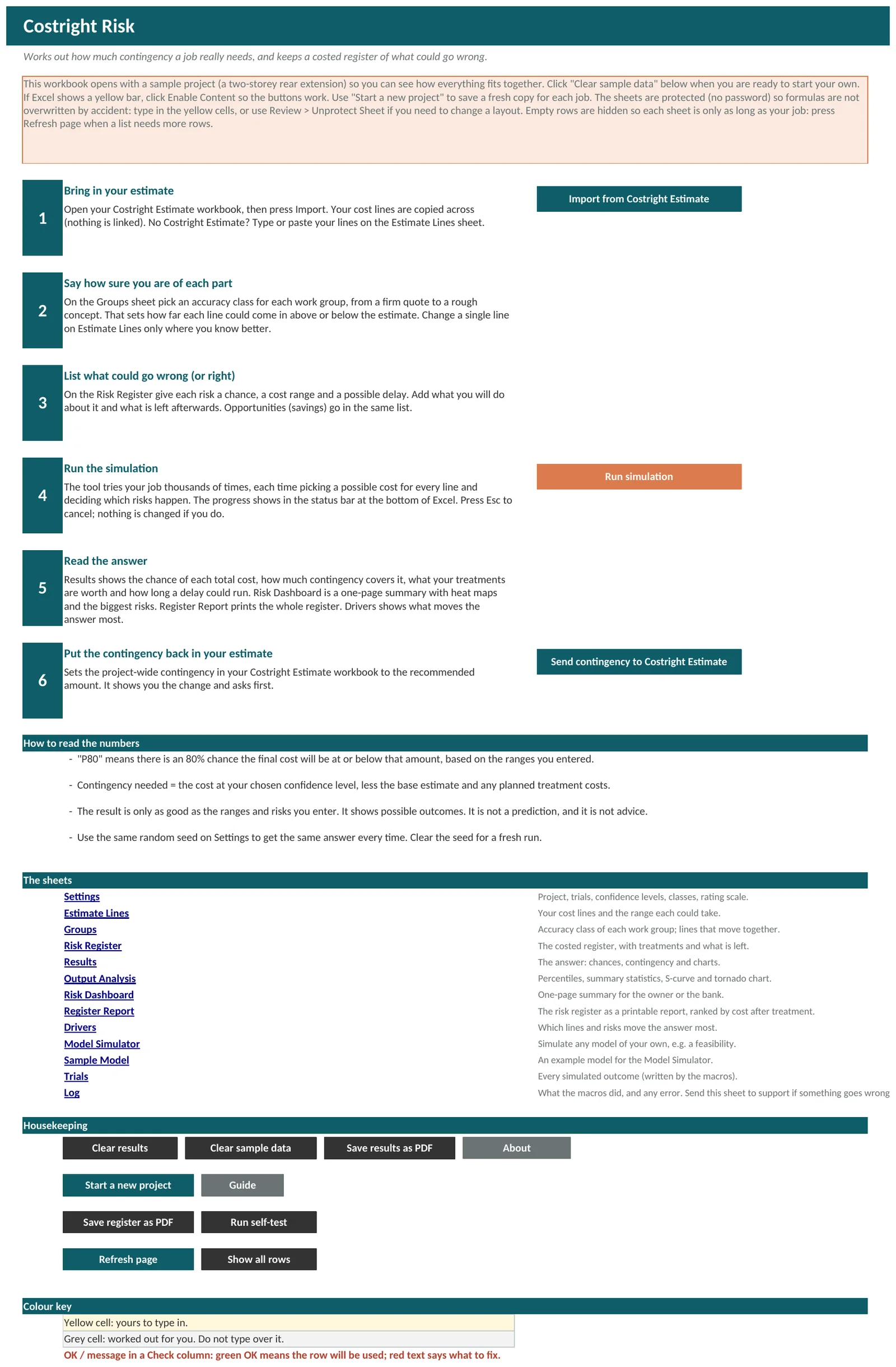
A costed risk register
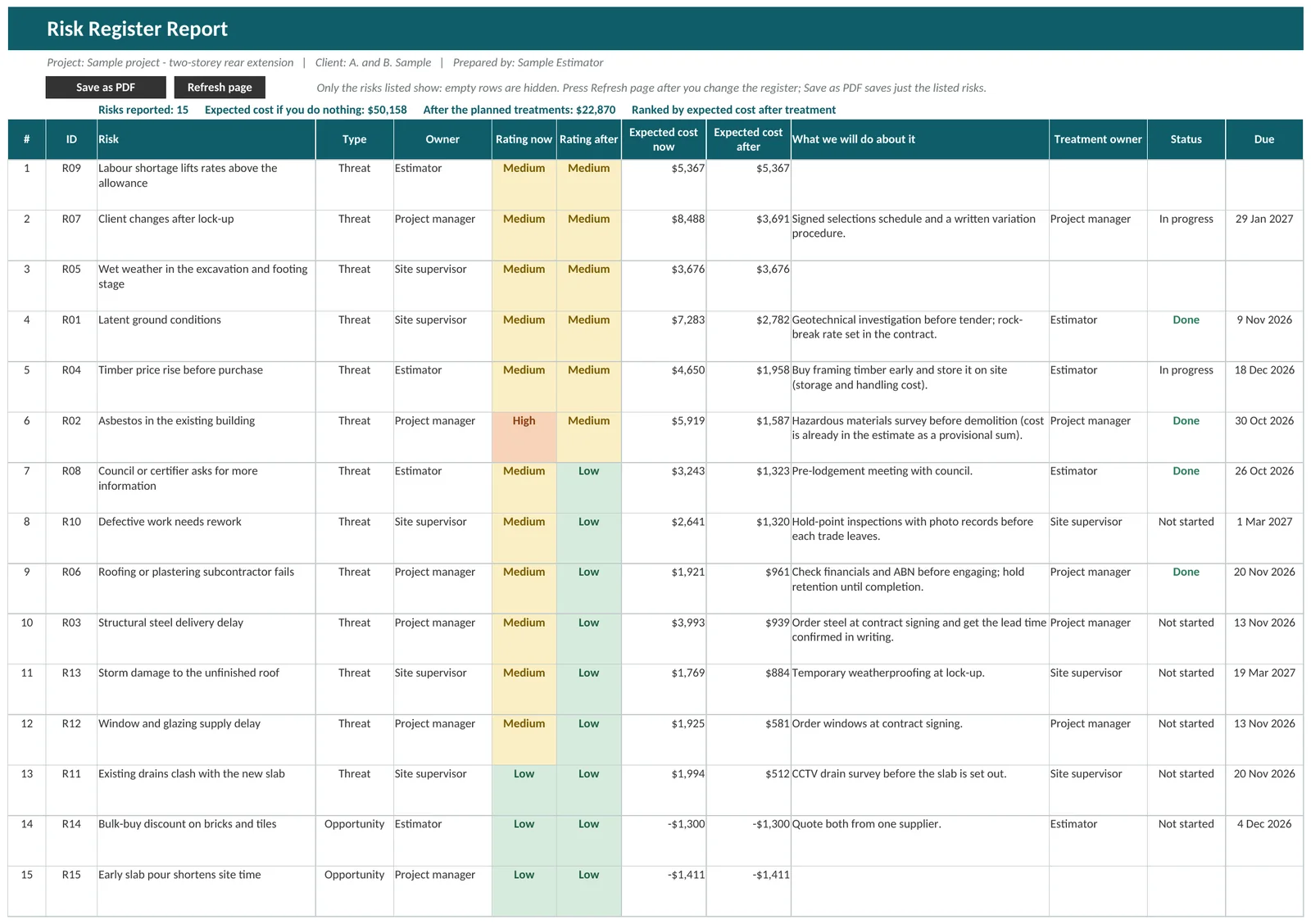
Each risk carries a cost, not just a rating. Record what could happen, what it would cost, what you will do about it, and what is left once you have. The register feeds the simulation, so the numbers you write down are the numbers that set contingency.
- Chance, a low, most likely and high cost, and a delay in days for each risk
- A 5 by 5 likelihood and consequence rating, before and after treatment
- Treatment actions with an owner, a due date, a status and the cost of doing it
- The chance and cost that remain after treatment
- Threats and opportunities (savings) in one list
- Count risks three ways: if you do nothing, after completed treatments only, or as if every planned treatment works
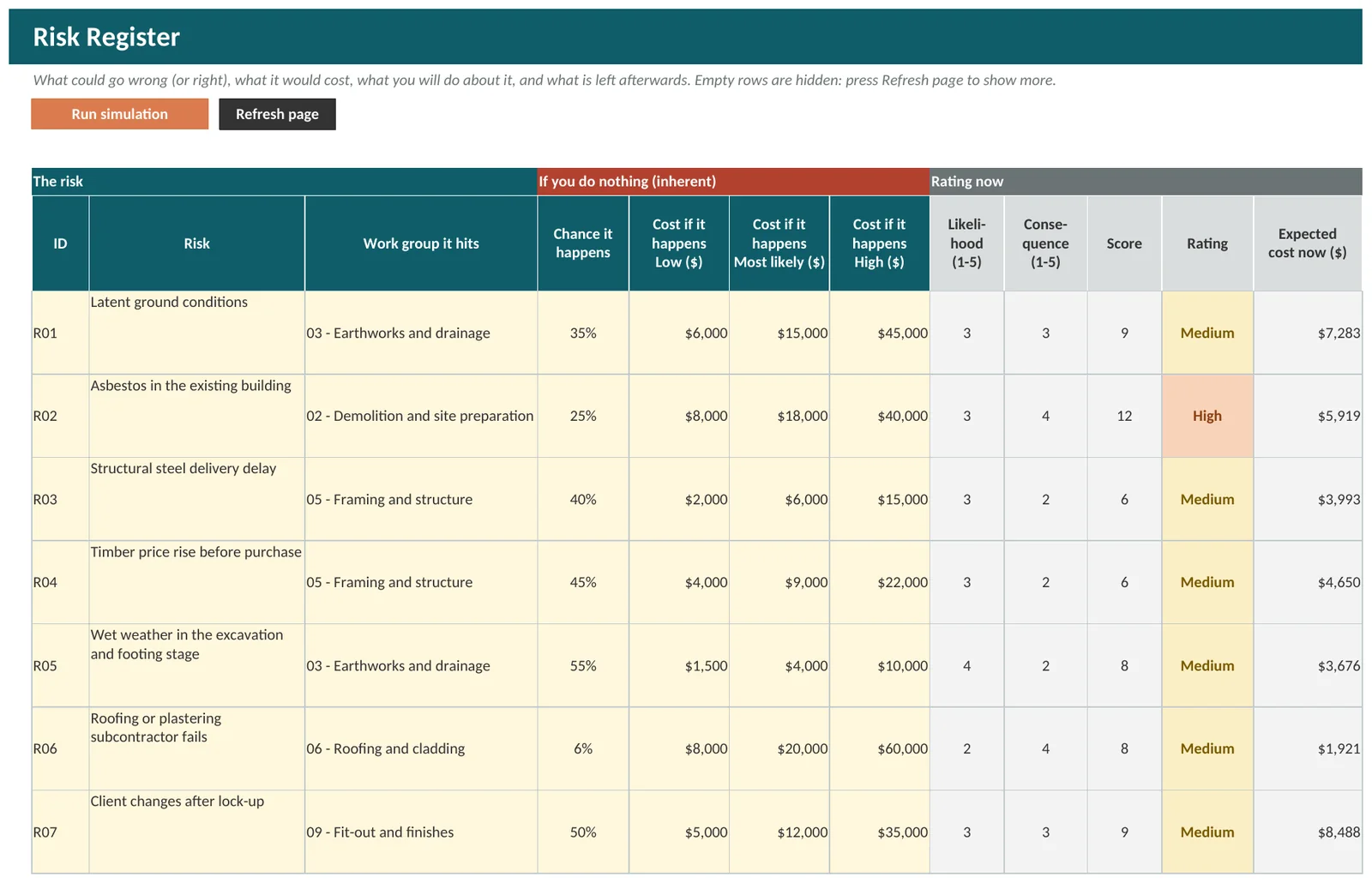
Treatments with a price on them
Spending to reduce a risk is a cost too. The register counts the cost of each treatment, and the chance and cost left after it, so you can see whether a treatment pays for itself.
- Expected cost now and expected cost after treatment, side by side
- A Check column says what to fix on any row that cannot be used yet
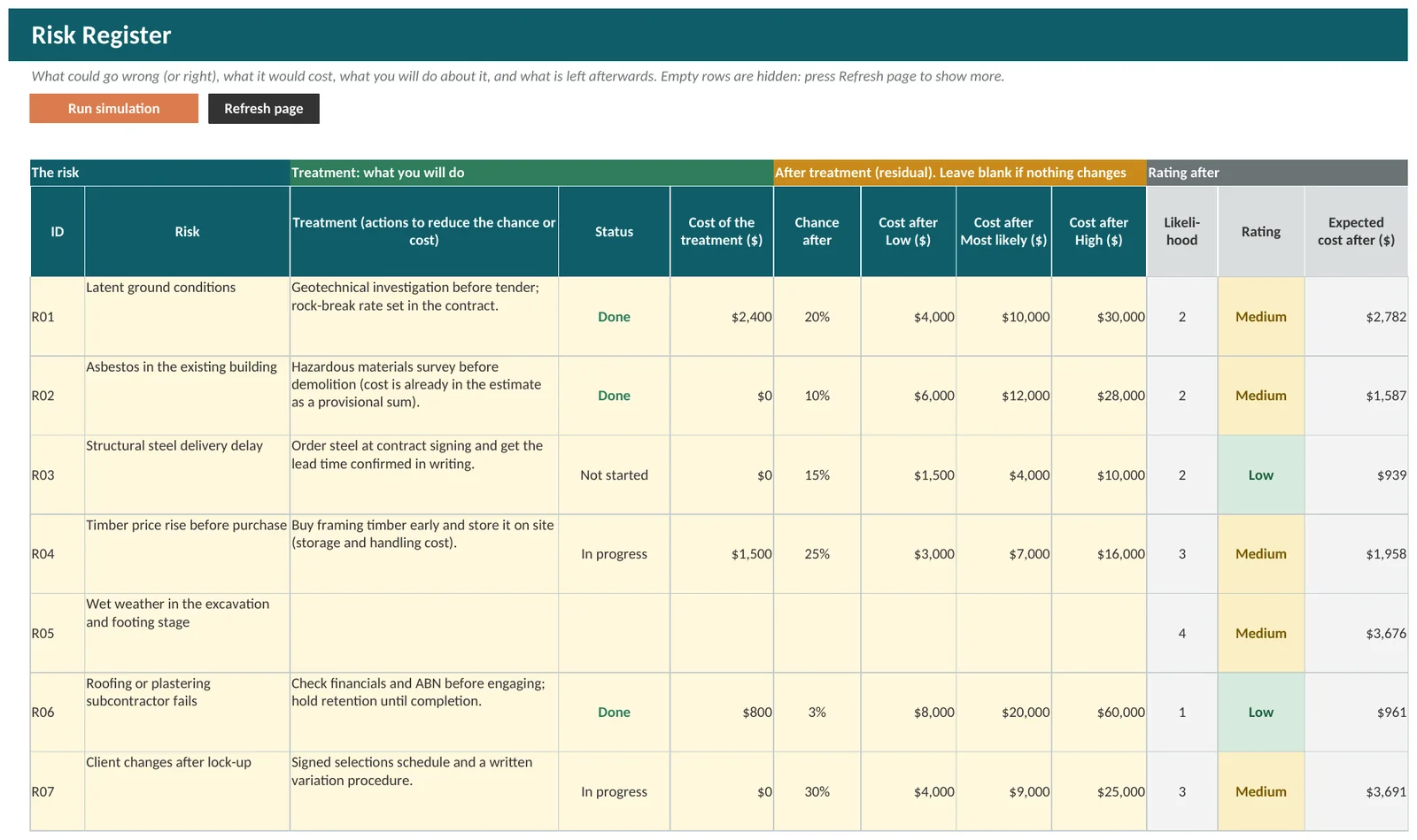
A register report you can print
Register Report lists the whole register as a printable page, ranked by expected cost after treatment. Save register as PDF saves just the risks that are listed.
An answer you can explain
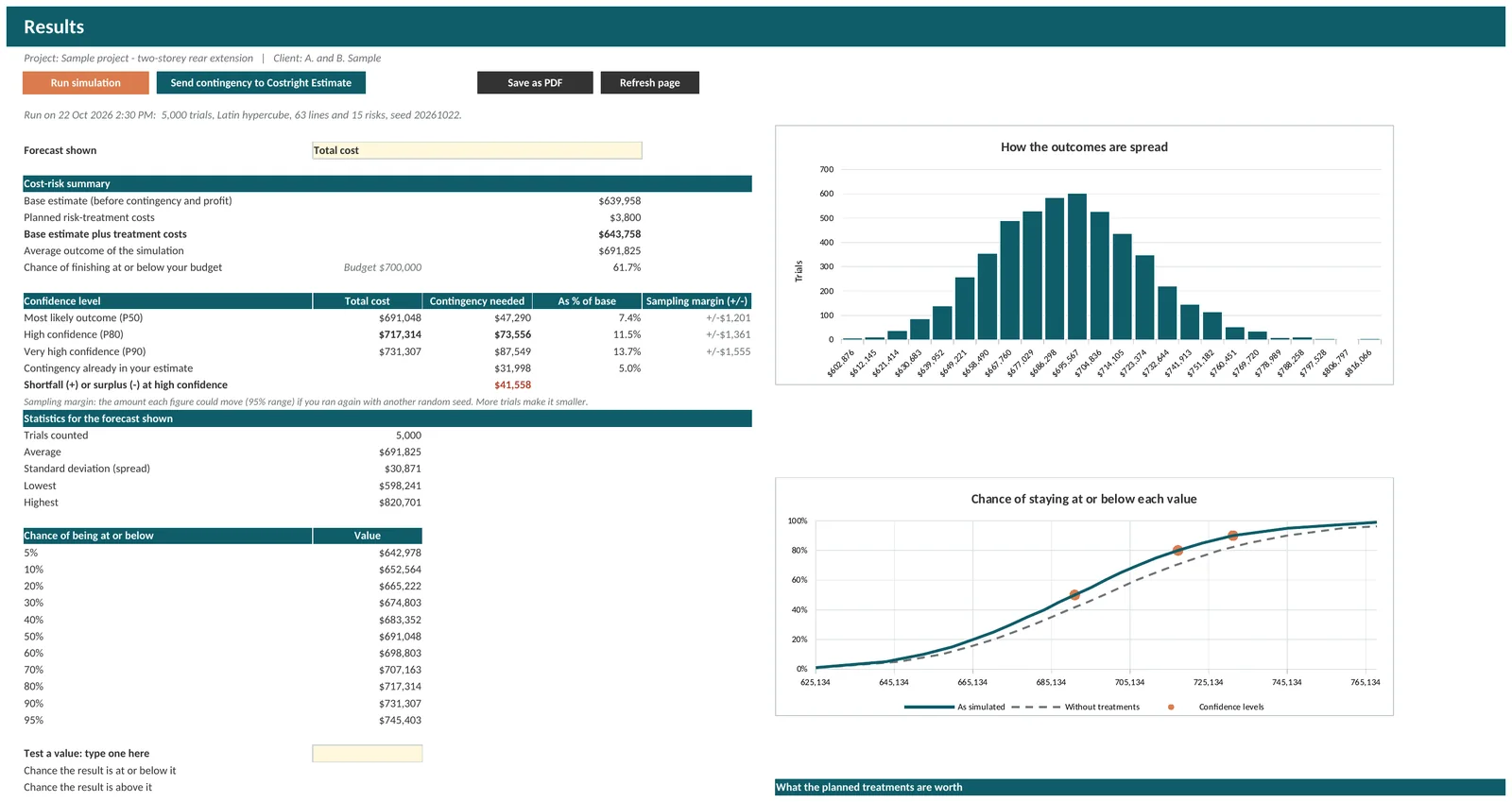
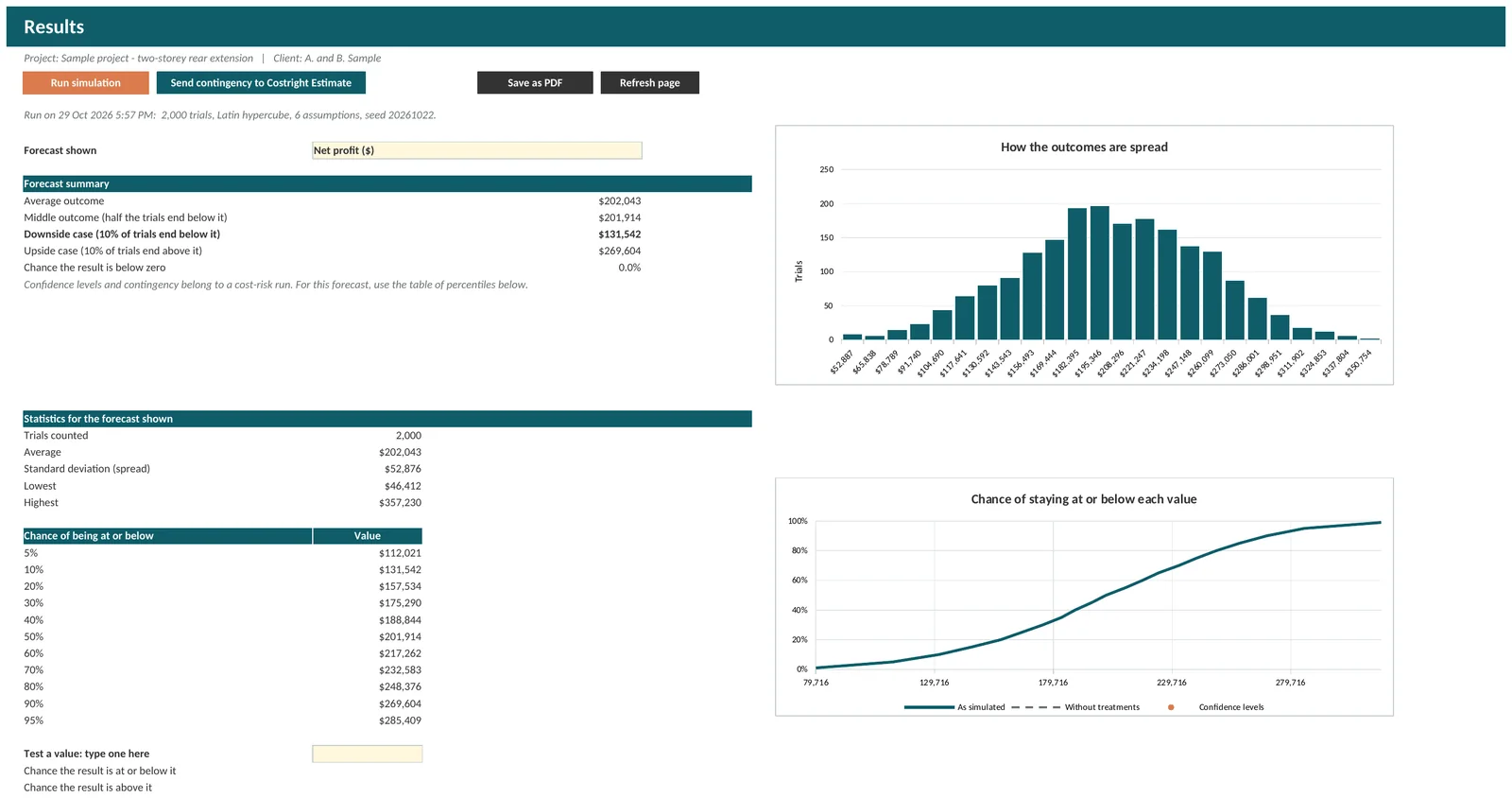
Results shows more than one number, so you can choose how much risk to carry.
The chance of each total
“P80” means there is an 80% chance the final cost will be at or below that amount, based on the ranges and risks you entered. Contingency needed is the cost at your chosen confidence level, less the base estimate and any planned treatment costs.
- Most likely, high and very high confidence levels, which you can change
- The shortfall or surplus against the contingency already in your estimate
- Type a budget and see the chance of finishing at or below it
- Run it again with the same random seed and get the same answer
Contingency by work group
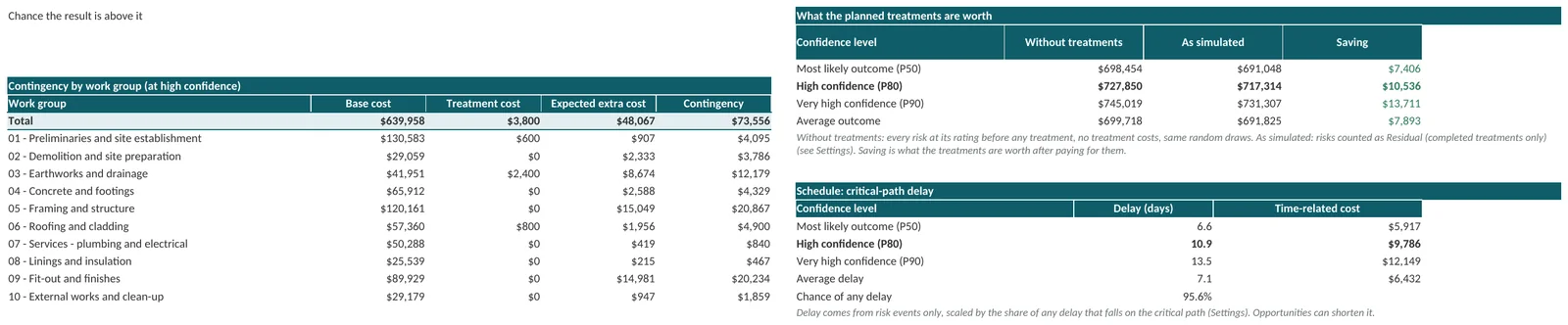
The total is split by work group, so you can see where the contingency is needed and put it where it belongs.
- Base cost, treatment cost and expected extra cost for each group
- Contingency at the confidence level you choose
- What the planned treatments are worth, and the delay that could cost you
Output Analysis: percentiles, statistics and a tornado chart
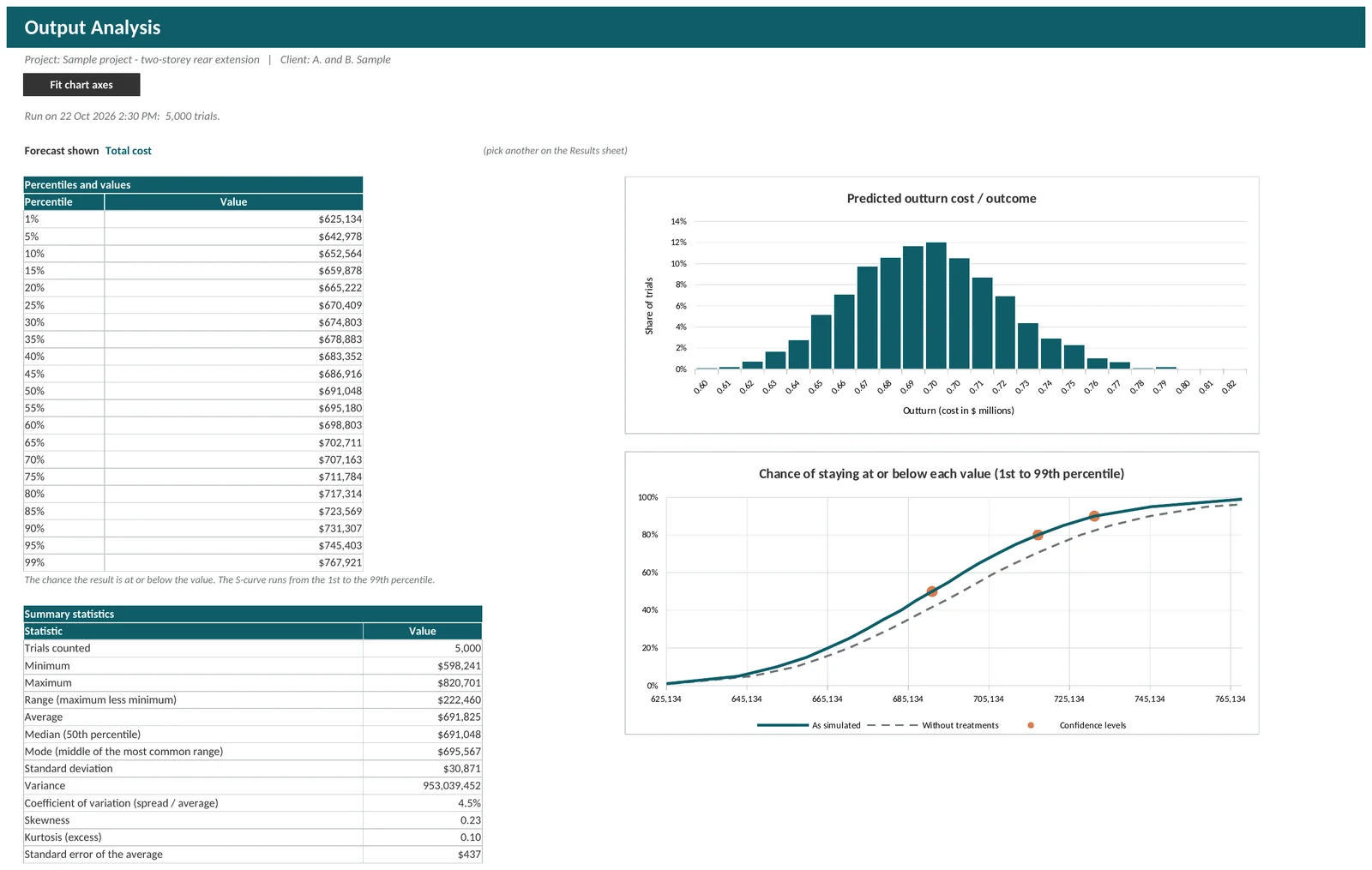
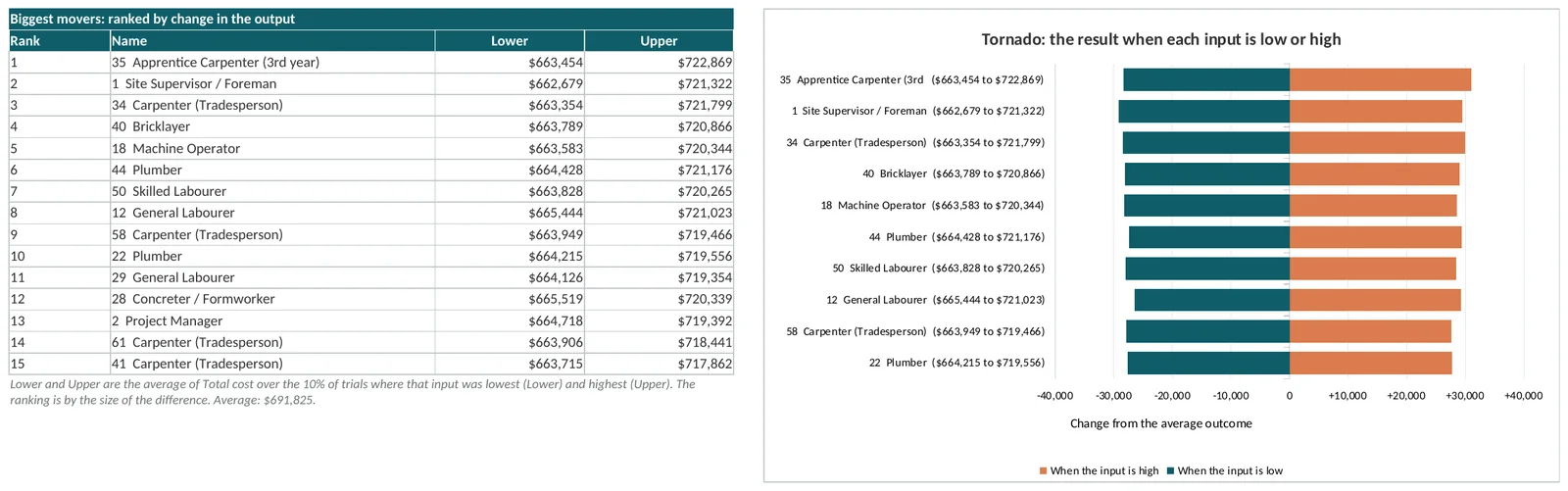
For the person who wants the working behind the number. Output Analysis lists the value at every fifth percentile, plus the 1st and 99th, with summary statistics, an S-curve and a tornado chart of what moves the total.
- A table of percentiles and values, so you can read off any confidence level
- Average, median, standard deviation, minimum, maximum, skewness and more
- An S-curve from the 1st to the 99th percentile
- A tornado chart and ranking table of the lines and risks that move the answer most
Charts for the owner or the bank
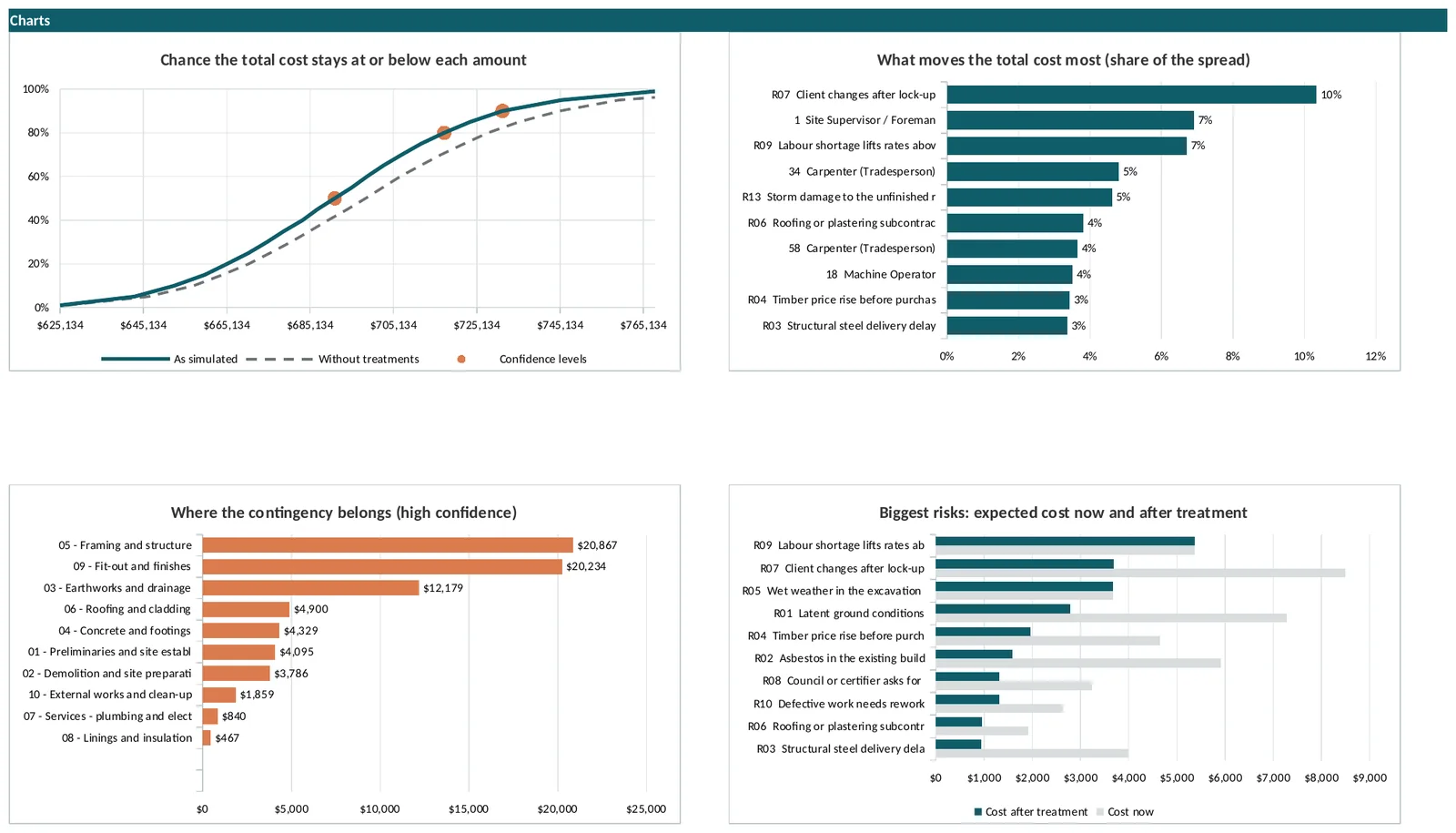
The Risk Dashboard puts the answer on one page, with charts ready to show to a client, a bank or a tender panel.
- The chance the total cost stays at or below each amount
- What moves the total cost most, as a share of the spread
- Where the contingency belongs, by work group
- The biggest risks, expected cost now and after treatment
What moves the answer most
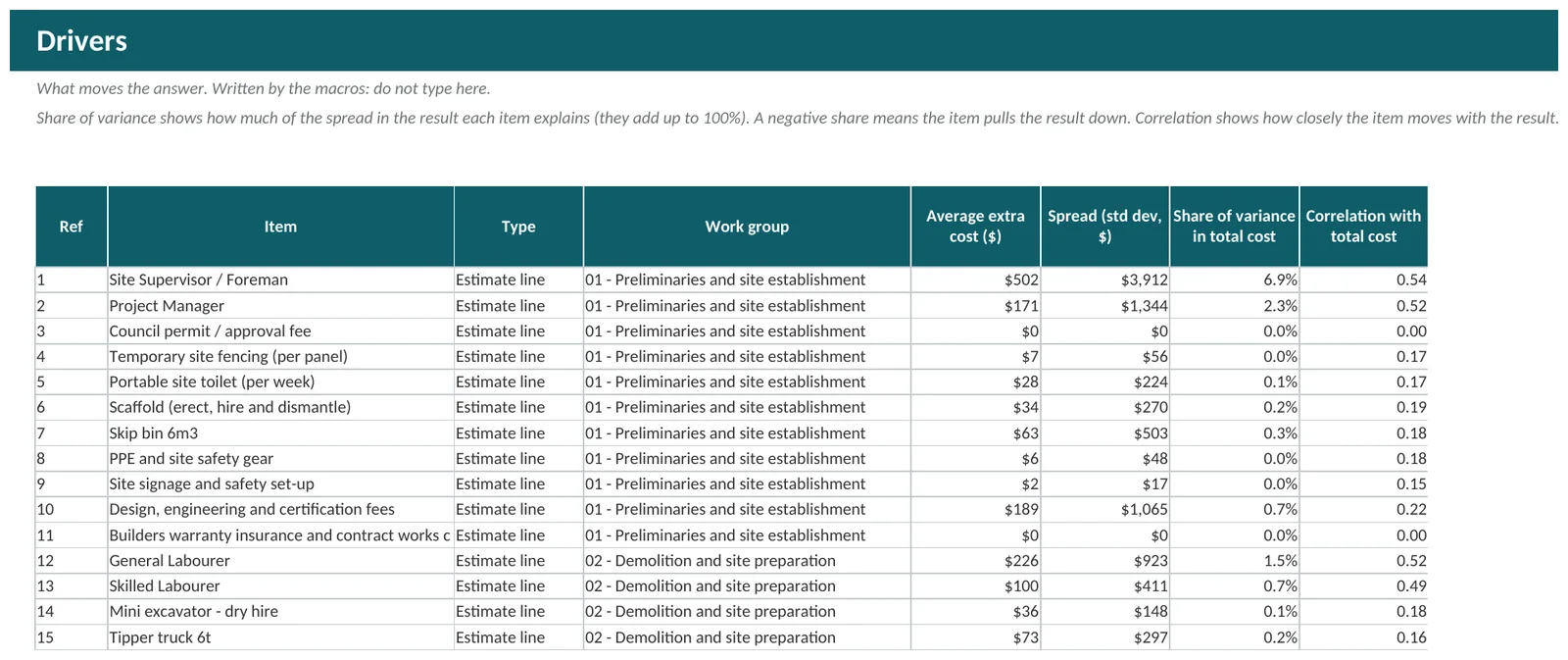
Drivers ranks the lines and risks by how much of the spread in the result each one explains. It shows you where a better quote or a firmer scope would narrow the range the most.
- Average extra cost and spread for every line and risk
- Share of variance: how much of the spread in the total each one explains
- Correlation with the total cost
Set it up to suit how you estimate
Defaults are sensible. Every one of them can be changed.
Accuracy classes
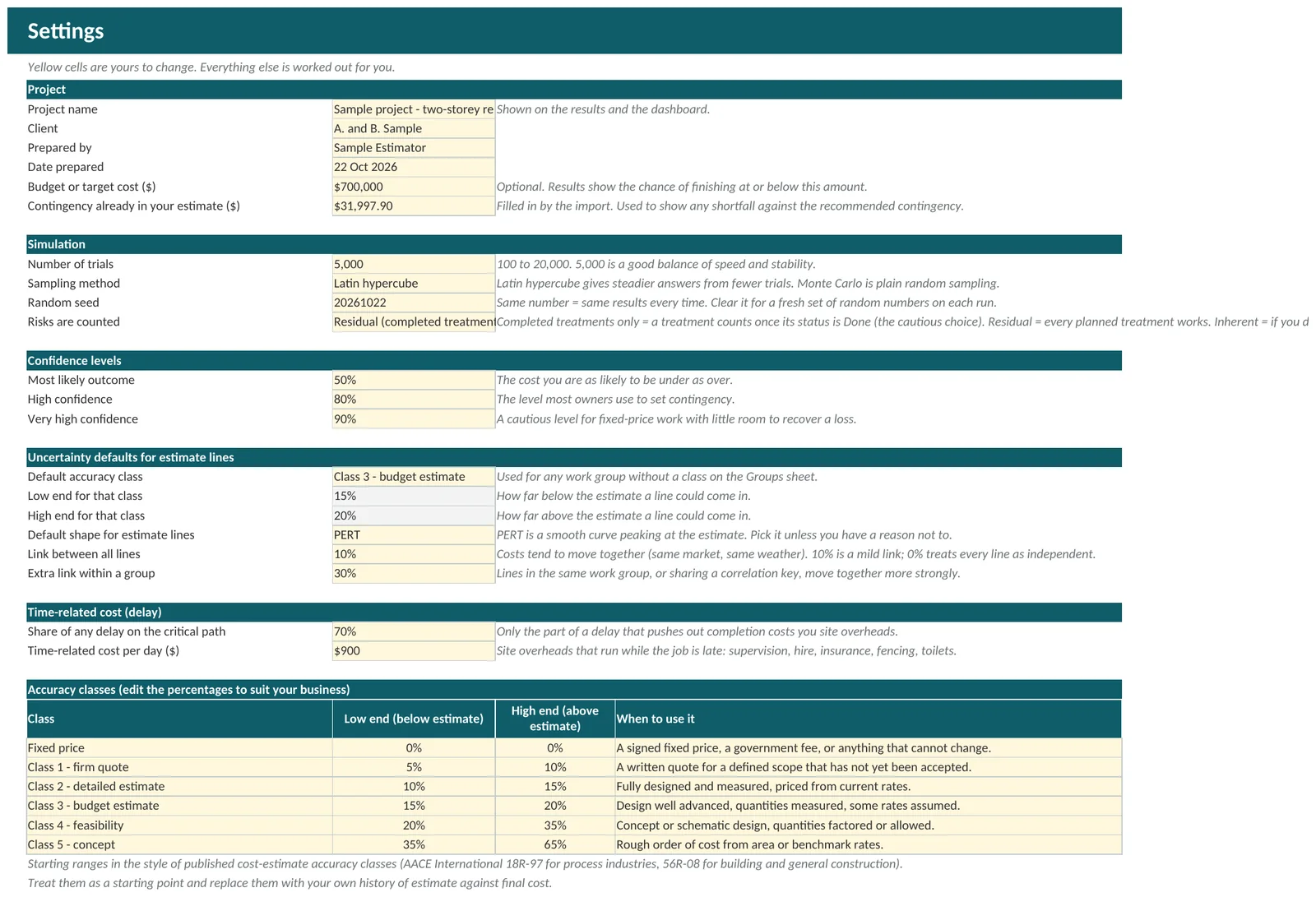
Five accuracy classes and a fixed-price class set how far a line can move. The starting ranges follow the style of the published cost-estimate accuracy classes (AACE International 18R-97 for process industries and 56R-08 for building and general construction), and you can edit the percentages to match your own history.
- Fixed price, Class 1 firm quote, Class 2 detailed estimate, Class 3 budget estimate, Class 4 feasibility, Class 5 concept
- Costs tend to move together, so a link between lines is built in. Lines in the same work group can be linked more strongly
- Plain random sampling or Latin hypercube, which gives steadier answers from fewer trials
- Time-related cost: site overheads that run while the job is late
Groups that move together
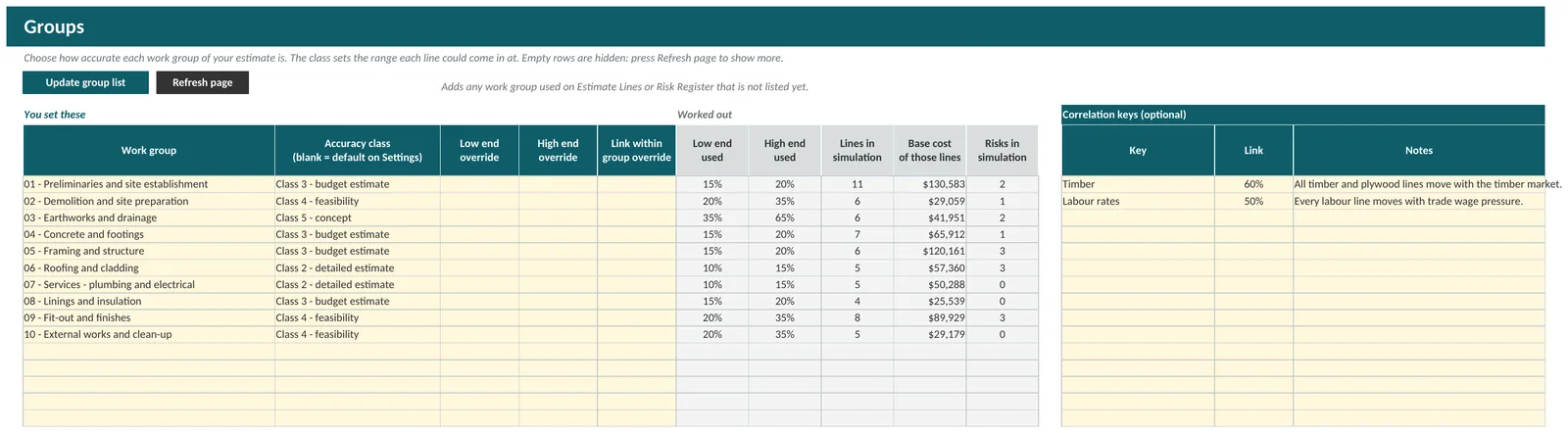
Pick an accuracy class for each work group, and link lines that share a market, a supplier or the weather. Lines that move together make the spread wider, which is how real jobs behave.
- An accuracy class for each work group, with the low and high end it gives
- Override the range or the link for a single group
- Correlation keys: lines that share a key, such as Timber, move together
The Model Simulator: simulate any Excel model
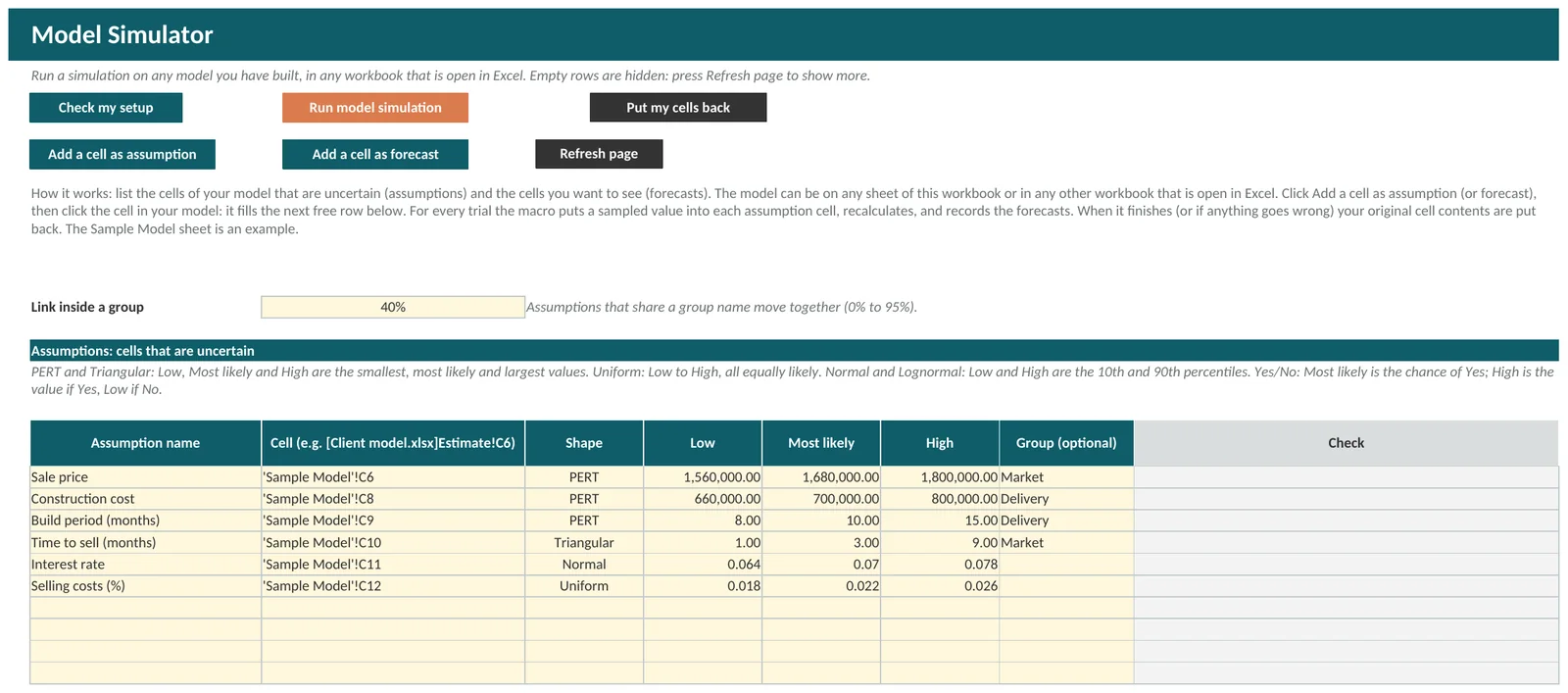
Not every question is a construction estimate. Open your own model, a feasibility, a cash flow or a bid, in any workbook. Click Add a cell as assumption, then click an uncertain cell. Click Add a cell as forecast, then click a cell you want to see. Then click Run model simulation.
- Works on a model in this workbook or in any other workbook that is open in Excel
- Shapes: PERT, Triangular, Uniform, Normal, Lognormal and Yes/No
- Assumptions in the same group can move together
- Up to 5 forecast cells, each shown as a currency, a percentage or a number
- Your original cell contents are put back when the run finishes, or when you press Put my cells back
- A sample feasibility model is included to copy from
You build the model. The simulator does not write it for you. When the model is in another workbook, Costright Risk asks before it temporarily puts sampled numbers into that workbook, so save it first.
Made for working on real jobs
- Start a new project saves a copy of the workbook under a new name for each job
- Clear sample data empties the sample project and keeps your settings and layout
- Empty rows are hidden, so each sheet is only as long as your job. Press Refresh page when a list needs more rows, and Show all rows to bring every row back
- Sheets are protected without a password, so a formula is not overwritten by accident. Type in the yellow cells
- Save results as PDF and Save register as PDF
- A built-in self-test checks that the random numbers and the calculations are working
What it is not
- Not a prediction. It shows possible outcomes, and it is only as good as the ranges and risks you enter
- Not advice
- Not live-linked. Import copies your lines across, and Send contingency is a click you make
- Not a schedule risk tool. Delays are costed as days and a daily cost, and it does not model a programme
- Not a replacement for specialist software on very large or complex programmes
- Windows desktop Excel only. Not Excel for the web, Mac, phones or tablets
Questions about Costright Risk
Do I need the Costright Estimate to use it?
No. You can type or paste cost lines onto the Estimate Lines sheet. If you do use the Costright Estimate, Import copies the lines across and Send contingency updates your estimate after it asks.
Is it an add-in?
No. It is one Excel workbook with the macros inside it. There is nothing to install or load: open the file, click Enable Content if Excel asks, and use the buttons on the Start Here sheet.
Is there a trial?
No. The workbook works fully as soon as you open it, and it never connects to the internet. See the refund terms if it turns out not to suit you.
How do I keep a separate file for each project?
Click Start a new project. It saves a copy of the workbook under a new name and opens it, so each project keeps its own lines, register, settings and results. The copy holds whatever was in the original, so click Clear sample data and Clear results first if you want it empty.
Will Excel show a security warning?
It can, the first time, because the workbook contains macros and Windows marks downloaded files. The guide to opening your workbooks shows how to unblock the file.
Why do I get a different answer each run?
The workbook uses random numbers. Type a number in the Random seed cell on Settings to get the same answer every time. Clear it for a fresh run.
What is a P80?
There is an 80% chance the final cost will be at or below that amount, based on the ranges and risks you entered.
Put a number on your contingency
Costright Risk is $395 once, and $790 with the Costright Estimate.