Price the job. Then price what could go wrong.
Costright Estimate is a quoting workbook for Australian builders and trade contractors. Price the job from your own rates, print the quote, and see when the money goes out. Costright Risk then shows how much contingency the job really needs.
- Runs in
- Windows desktop Excel (Microsoft 365 or Excel 2024)
- Price
- Costright Estimate $495, Costright Risk $395. Once, ex GST
- Your files
- Stay on your computer. Works offline
- Activation
- None. No licence key, no sign-in, no subscription
- Users
- One business, up to 3 people
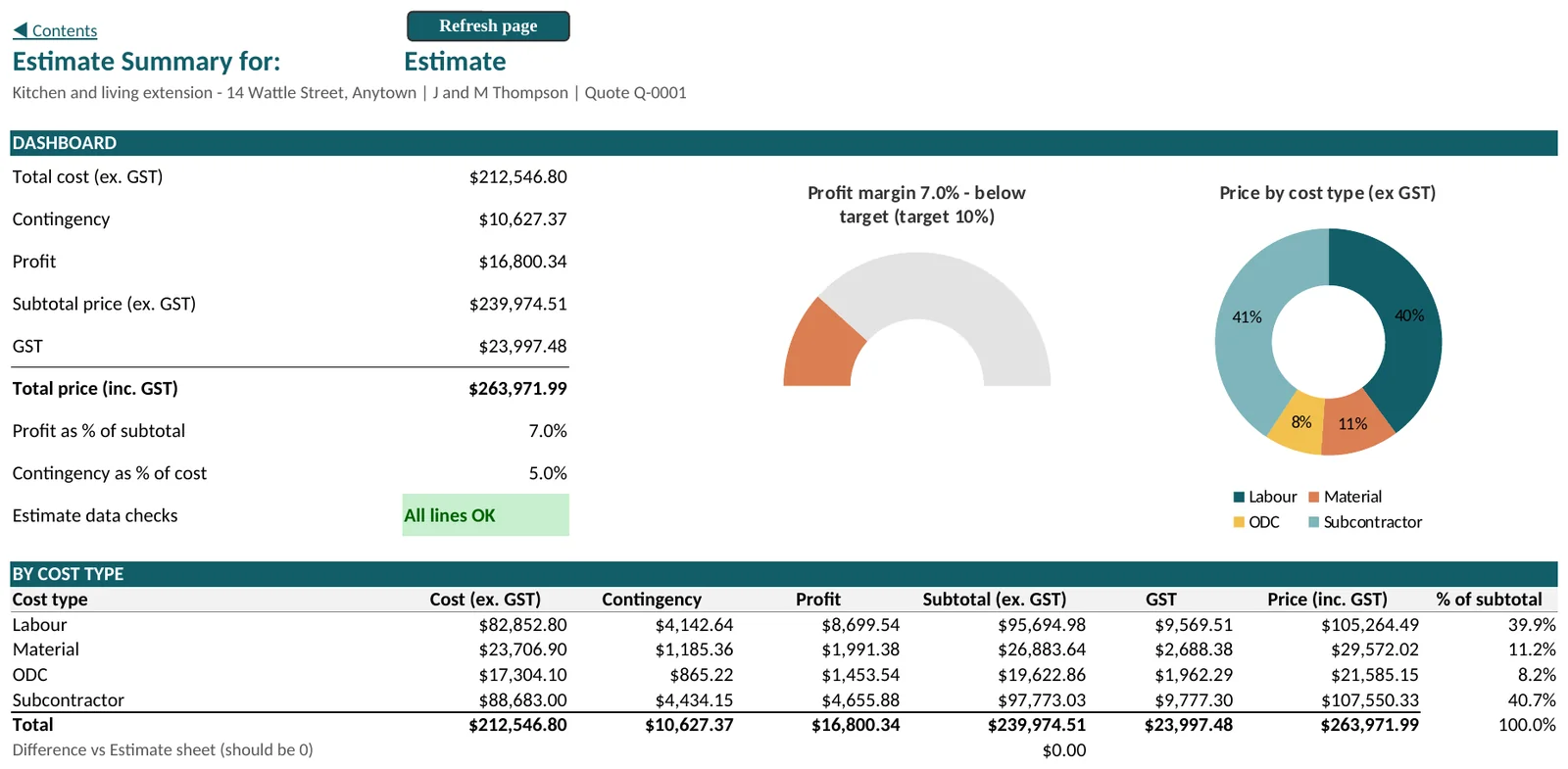
From a priced list to a quote the customer can read
Everything lives in one workbook that you own and keep on your computer. Yellow cells are yours to fill in. Grey cells work themselves out.
Price every line from your own rates
Pick the WBS item, the cost type and the description, then enter a quantity or a dollar amount. The workbook looks up your rate, then adds overheads, contingency, profit and GST. Each line checks itself and tells you the first thing to fix.
- Labour, material, plant and subcontractors, with 186 lines ready to use and an Add rows button for more
- Rates sit on your own rate sheets, entered once and used by every Estimate
- Variations and alternative Estimates on their own tabs, up to 8 of each
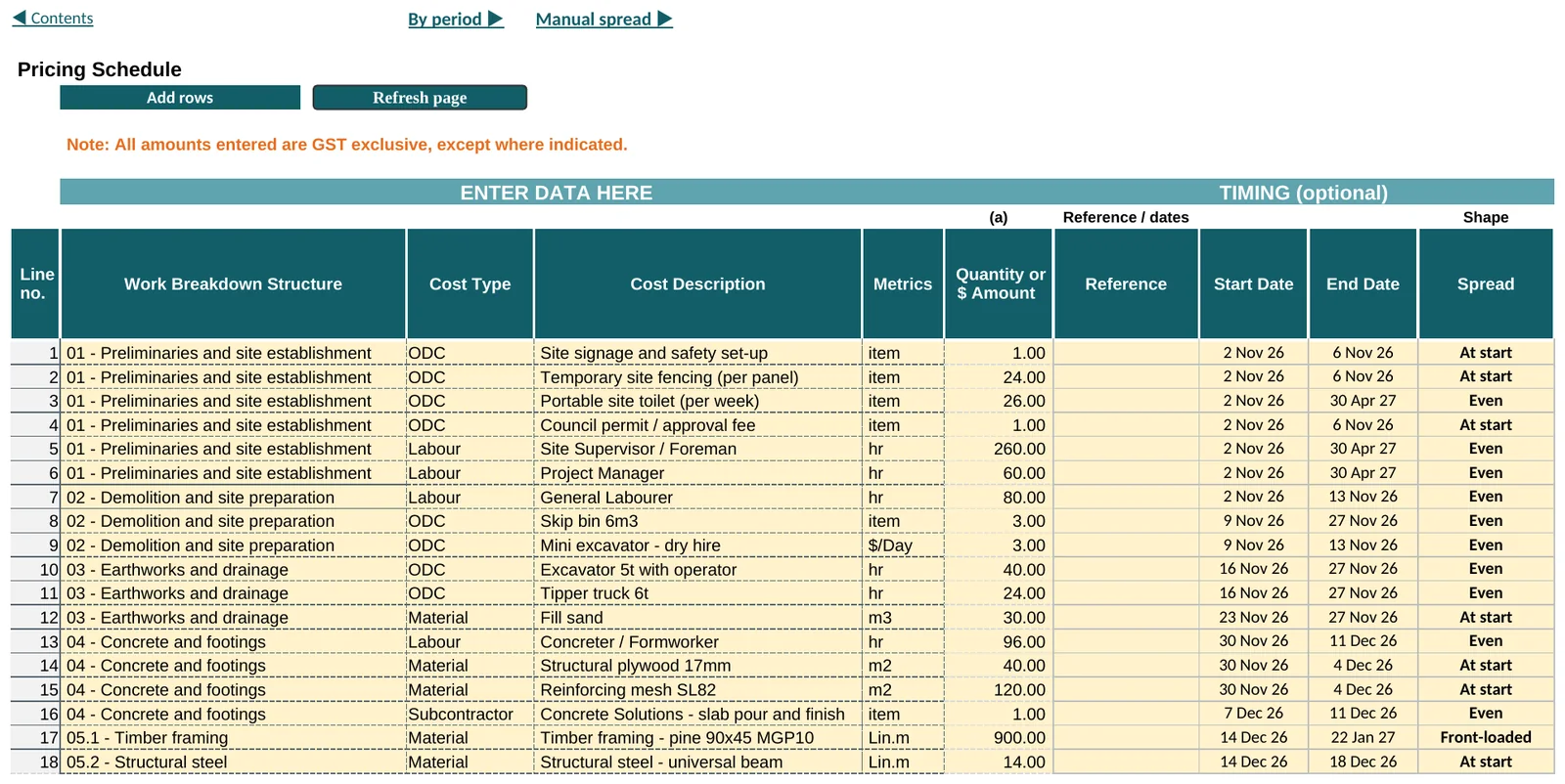
Send a quote or an invoice
Choose Quote or Invoice, the date and the Estimate you want to send. Preview it, then save a PDF. The Summary document shows price by work breakdown item with your payment details and terms. The Detailed document lists every line with unit prices.
- The customer sees prices, not your costs
- Include no variations, one, or all approved variations
- Your business details and terms print from one sheet
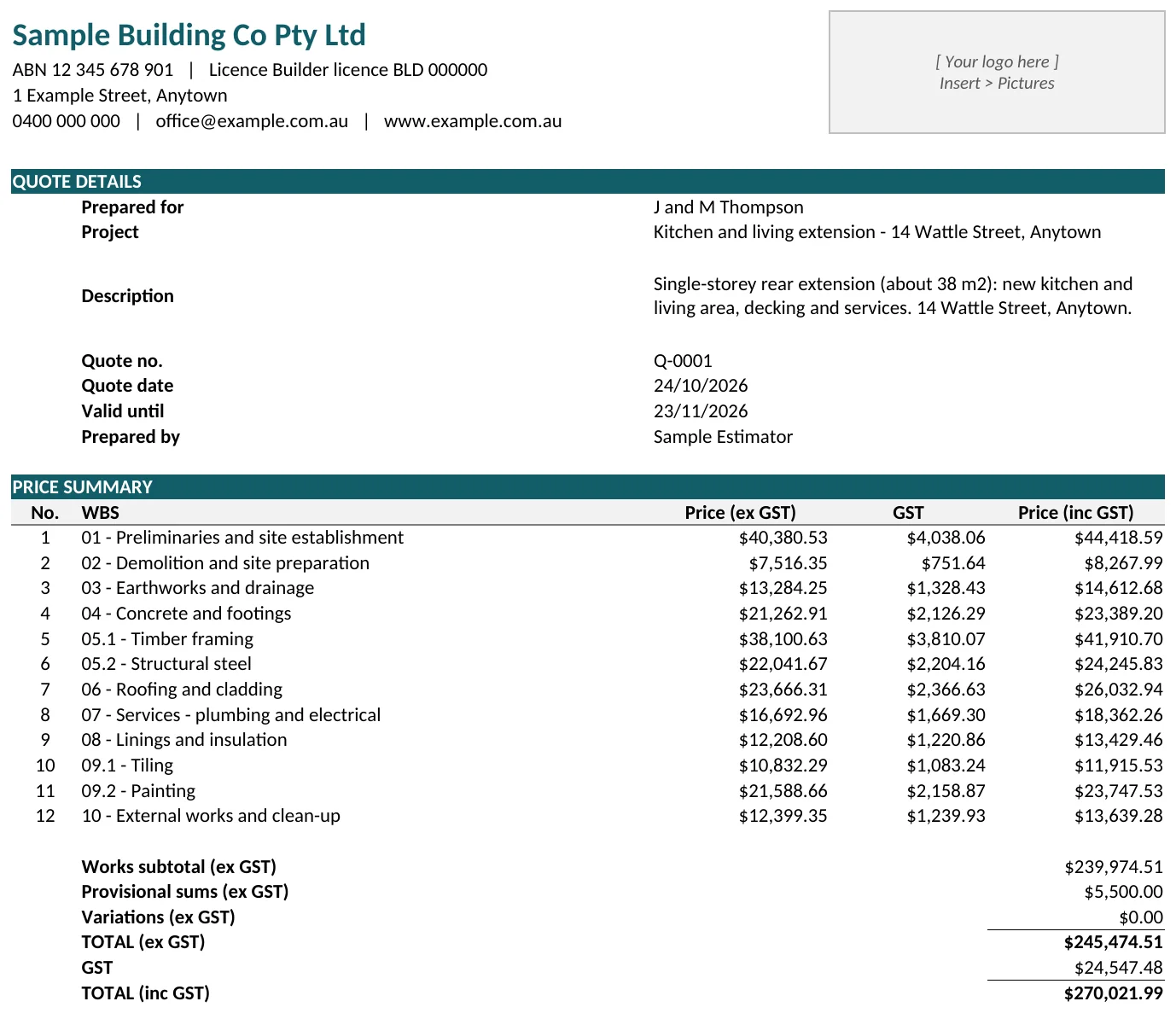
See when the money is spent
Give each line a start date, an end date and a shape for its spend. The Cost Timeline shows the cost by week, month, quarter or year, with a chart. As the job runs, type in what was actually spent and compare it with the plan.
More about the Cost Timeline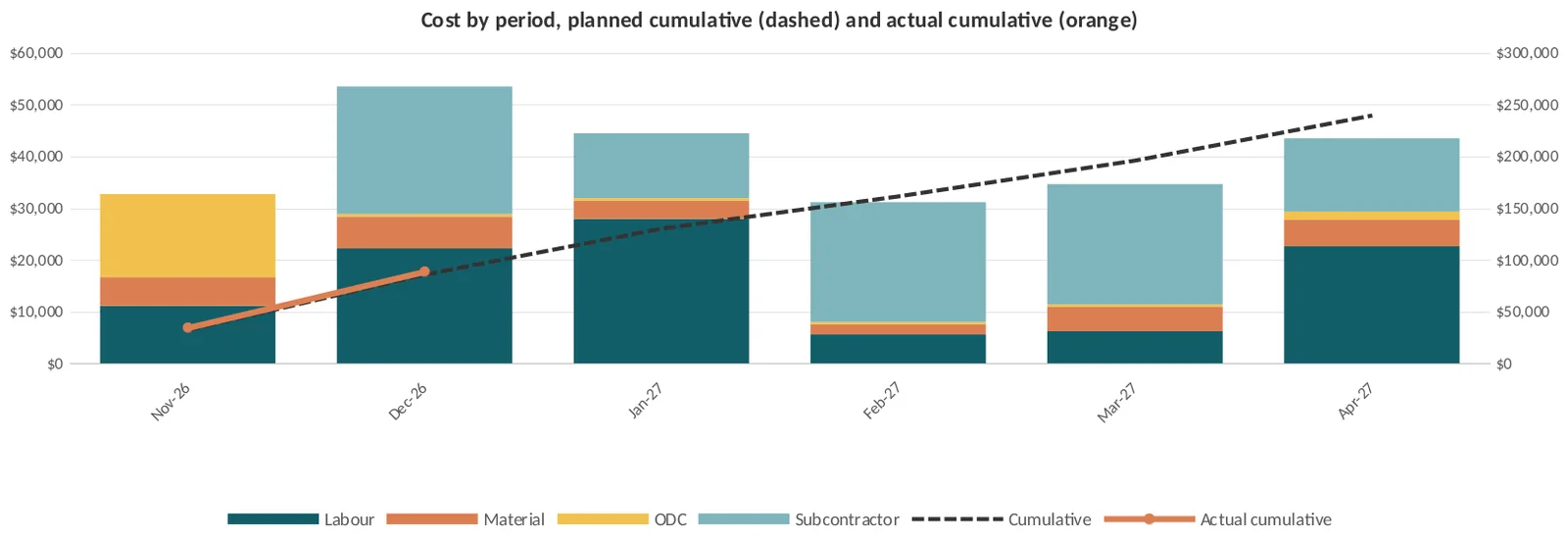
Two workbooks. Buy one or both.
Each one is a separate Excel workbook that you keep on your own computer. Use the Estimate on its own, or add the Risk when a job needs a contingency you can defend.
| Product | What it does | Price (ex GST) |
|---|---|---|
| Costright Estimate | Estimate, summary, cost timeline, escalation, variations, quote and invoice. | $495 once |
| Costright Risk | Cost-risk simulation, a costed risk register and a simulator for any Excel model. | $395 once |
Buy both together for $790 and save $100. See the full price list.
How much contingency does this job really need?
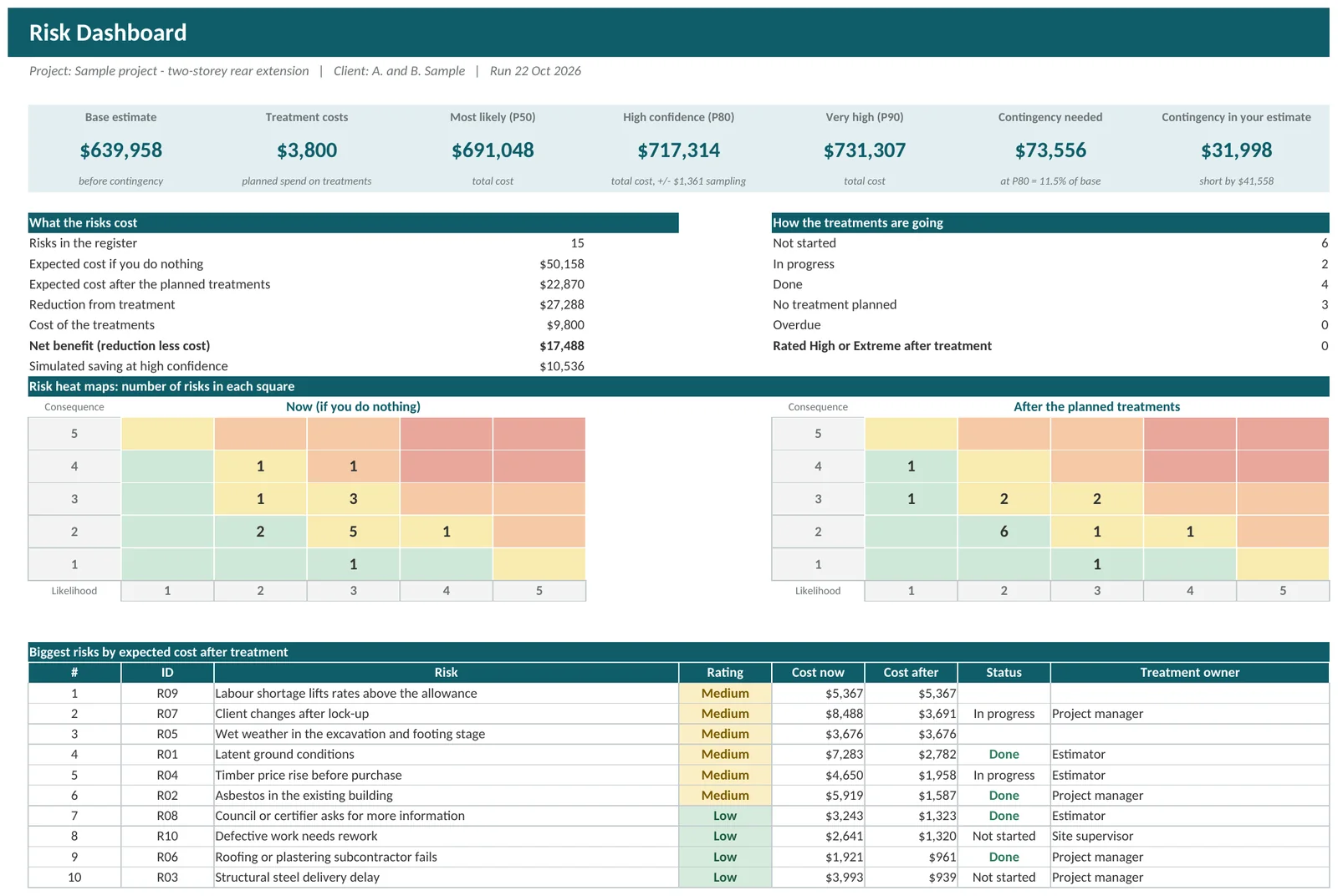
Most contingency is a round percentage. Costright Risk replaces it with a number you can explain. It runs the job thousands of times, with a range on every cost and a chance on every risk on your register, then shows the chance of each total.
- A costed risk register with treatments and what is left afterwards
- The chance of finishing at or below your budget, and the contingency that covers it
- Which lines and risks move the answer most
- Reads your estimate from the Costright Estimate, or you can type your own lines
What it is, and what it is not
They are spreadsheets. That keeps them cheap and keeps your files yours, and it sets some limits.
What you get
- Excel workbooks that you keep on your own computer
- Works offline
- A quote or an invoice from the same estimate
- Variations priced on their own tabs
- A risk register and a contingency you can explain
- No monthly fee, no licence key and nothing to activate
What it is not
- Not a cloud platform. There is no mobile app, and two people cannot edit at once
- No links to accounting, payroll or other software
- Windows desktop Excel only. Mac and Excel on the web are not supported
- Not advice. Results are only as good as the rates and ranges you put in
Questions people ask first
Do I need to know macros or VBA?
No. The buttons run macros that are already in the workbook. The first time you open one, Windows may block it and Excel may ask you to click Enable Content. The guide to opening your workbooks shows the steps.
Does it work on a Mac or in Excel on the web?
No. It needs Windows desktop Excel, Microsoft 365 or Excel 2024.
Is there a free trial?
No. The workbooks never connect to the internet, so there is nothing that could switch a trial off. Every sheet is shown on these pages, the guides take you through a first job, and you can ask us anything before you buy. If it turns out not to suit you, the refund terms apply.
Do the rates come with it?
The Costright Estimate comes with sample rates so you can see how it works. Replace them with your own on the Labour Rates, Material, Other Direct Cost and Subcontractors sheets. Costright does not supply award rates or a price book.
Can I use the Risk without the Estimate?
Yes. Type or paste your cost lines onto the Estimate Lines sheet of Costright Risk, or bring them in from a Costright Estimate workbook with one click.
Where does my data go?
Nowhere. Your estimates, rates and risk registers stay in your workbooks on your computer. The workbooks never connect to the internet, and nothing is activated online.
Quote your next job with it
Two workbooks, one price each, and no licence keys. See the prices and what is included.